
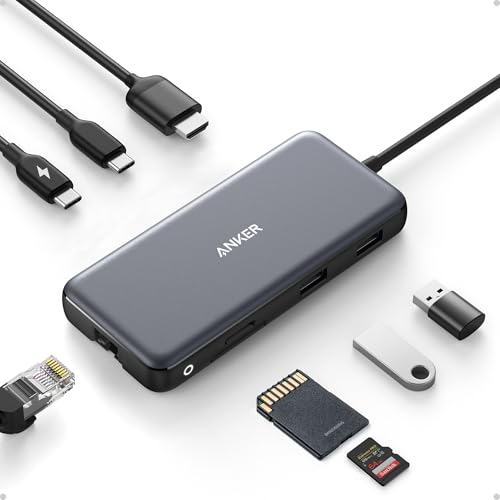
Your laptop has one USB-C port. Your presentation needs HDMI. Your files need transferring. Your camera card needs reading. And yes, you still need to charge. Welcome to the reality of modern computing—where a single port has to do the work of eight.
Eight Functions, One Cable
The Anker 8-in-1 USB-C Hub consolidates what would normally require juggling multiple adapters. Built into the hub you'll find:
- USB-C Power Delivery input (supports up to 85W pass-through charging)
- USB-C data port
- Two USB-A data ports
- HDMI port for video output
- Ethernet port for wired connectivity
- microSD and SD card reader
The attached 7.48-inch USB-C cable means you're not hunting for another cord—just plug it into your laptop and you're ready to expand.
Keep Working While Staying Powered
Pass-through charging is the feature that makes this hub genuinely useful for laptop users. You can plug in your power adapter to the hub's USB-C input, then plug the hub into your laptop. Your laptop charges while the hub handles everything else. Use a 100W Power Delivery charger and you'll have plenty of power for both charging and hub operation (the hub itself needs 15W).
Speed Where It Counts
Data transfers across the USB-C and USB-A ports max out at 10 Gbps, so moving files from external drives or your camera doesn't become a waiting game. Video output supports 4K@60Hz (on DP 1.4 laptops) or 4K@30Hz (on DP 1.2 laptops), which handles presentations, video editing previews, and media playback without compromise.
Works with What You've Got
This hub is compatible with any USB-C laptop that supports DP Alt Mode and Power Delivery—which includes MacBooks (macOS 12 and newer), Windows 10 and 11, and most Chromebooks. It also works with USB4 and Thunderbolt connections.
If your workflow has outgrown a single USB-C port, this hub transforms your laptop from a bottleneck back into a workhorse. Check it out on Amazon and see how a single connection can expand your possibilities.
For more details and the affiliate link, head to the Anker USB-C Hub product page.